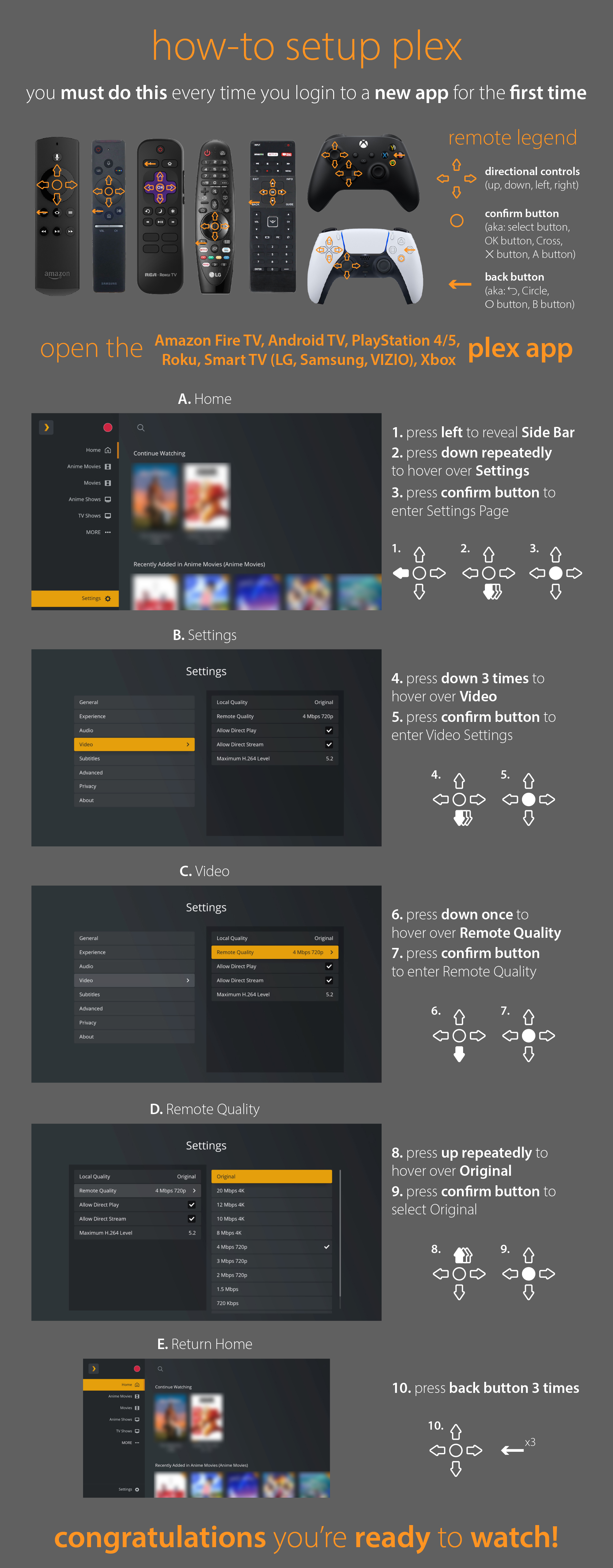
Setting Up Your Device
Important
Always set your Plex app's playback quality to Original Quality. A lower setting forces KEVFLIX to , possibly resulting in a blurry, lower-resolution picture.
Want the best picture possible?
Grab the exact setup guide for your device on the Media Clients Wiki , or .
Streaming on a Windows PC?
Skip the web browser and download the dedicated Plex for Windows app for a smoother, higher-quality experience.
Listening to audiobooks?
Download the official Plexamp app from your
mobile app store to listen to audiobooks.
For an even better experience, download the Audiobookshelf app
and email me to be set up, it's also free!
4K Movies & Shows
To get the most out of KEVFLIX ultra-HD content, keep these golden rules in mind.
First, verify your Plex app is optimized using the guide.
Disable eco, power-saving, or AI picture-enhancement modes on your TV.
Look for a dynamic picture mode — not sports, game, or movie mode.
These settings help unlock the full depth of 4K HDR colour and clarity.
Transcoding
Transcoding is when your Plex app forces KEVFLIX to convert a file into a smaller or different format while you watch.
This uses significant processing power and can affect the service during heavy traffic.
During peak hours, transcoding may be disabled to keep KEVFLIX running smoothly. You may receive an error if your device tries to transcode then.
4K content must be played at original quality. If your screen or device does not support 4K, use the standard version of the title.
Not sure how to verify your settings? Open .
Reporting Issues
Spot a glitched file, broken audio track, or mixed-up TV episodes? Let me know so I can fix it.
Use the built-in Report Issue button in your Plex app, usually found in the three-dots menu.
Alternatively, email [email protected] and I'll take a look as soon as possible.
Customizing Your Libraries
Don't care about anime? Only interested in documentaries? You don't have to look at content you don't use.
Personalize your home screen by pinning only the libraries you want. Open the three-dots menu beside any library in the sidebar to pin or unpin it.
Unpinning a library also keeps it out of your Recently Added sections.
Request New Content
Can't find a specific movie or show? If it exists, I can probably get it for you.
Visit the KEVFLIX request site , sign in with your Plex account, and submit your request.
Once approved, it will automatically become available on KEVFLIX.
MovieMatch
Stuck in scroll paralysis while choosing something to watch with friends or family? Let MovieMatch help.
Enter your name and share the unique room code with your watching partner. Swipe through suggestions independently; when you both choose the same title, the app alerts you.
Less browsing, more watching.
Frequently Asked Questions
Why did an existing title reappear in Recently Added?
My robot army constantly searches for upgrades to existing content. An upgraded copy may appear in Recently Added again.
How can I show my appreciation?
Every November I participate in Extra Life, a 24-hour gaming marathon supporting the Stollery Children's Hospital Foundation. Details are shared closer to the event.
I also accept rum. :)